Bluehost AI Builder is the new way to make a website or web app at Bluehost: you describe what you need in one sentence, refine it by chatting, and publish it live. It is $0 to start, no credit card, and paid plans are from $20/mo.
For this review I signed up for the Free plan and built a real website for a small business from a single prompt. Below I walk through every step with my own screenshots, explain exactly how credits work, and cover what the Free plan can and cannot do so you know when upgrading makes sense.
Key takeaways from my test
I built and published a 6-page site on the Free plan without entering a card. The first version took about 4 minutes, and each bundled chat edit took 1 to 2 minutes. The whole test used 4 credits, while publishing and dashboard edits used none. Free sites are not indexed by search engines, so a public business site needs a paid plan from $20/mo.

Bluehost AI Builder
A fast, beginner-friendly way to get a real business website or simple web app live without code. The Free plan is great for building and testing, but a public site on your own domain needs a paid plan.
- One sentence to a first version
- Edit everything by chatting
- Hosting included on every plan
- Site stays online at zero credits
- 24/7 human support
AI Builder Free, $0 to start, no credit card. Paid plans from $20/mo
Try Bluehost AI Builder View offer on provider websitePaid plans are billed monthly and renew automatically at the then-current rate until canceled. Your own domain requires a paid plan. I earn a commission if you sign up through this link.
What Is Bluehost AI Builder?
Bluehost AI Builder is a chat-based tool that turns a plain-language description into a website, a web app, or both. You do not pick a template or learn WordPress. You type what your business needs, answer a few quick questions, and watch the AI build it.
Once the first version appears, you keep talking to it. Ask for a new headline, a different color scheme, an extra page or a booking form, and it updates the preview beside the chat. When you are happy, you publish, and Bluehost hosts it for you.
It replaces the previous Bluehost AI Website Builder for new customers. If you already use that older product, nothing changes for you: Bluehost says existing AI Website Builder and AI Store customers keep their current plan, product and support.
Websites and web apps in one place
The interesting part is that AI Builder is not limited to brochure pages. It can also build web apps, which are tools your visitors use in the browser, such as a booking page, a quote request form or an order form your team tracks from an admin panel.
- Websites: pages that present a business, such as services, photos, opening hours and contact details.
- Web apps: forms, bookings, user accounts and an admin panel, all running in the browser.
- Both: start with one and add the other later in the same conversation.
These are web apps, not phone apps. They open in any browser on phones, tablets and computers, and you share them with a link, a QR code or a social post. Native apps for the Apple App Store or Google Play are not supported at this time.
Selling products online?
Bluehost AI Builder is for websites and web apps, not online stores. It does not handle product catalogs, carts or checkout. If you want to sell products, Bluehost points you to Bluehost AI Store instead.
How Bluehost AI Builder Works: The 5 Steps
Bluehost describes the process in five steps: describe, refine, watch it build, publish and manage. Here is what each one looks like in practice.
1. Describe your website in one sentence
Everything starts with a text box. You write a sentence or two about your business and what the site should do. You can also use the Add button to attach a logo or photos (PNG, JPG or WebP, up to 5 MB each), or give it the address of a site you like so it can match the look.
You can attach other files too, such as a PDF menu, a Word document with your service descriptions or a spreadsheet of prices, and tell the AI how to use them. One thing it cannot do is import an existing website directly. It can reference the address, but it will not copy your old content automatically.
2. Answer a few quick questions
If your idea needs more detail, AI Builder may ask up to three short multiple-choice questions, each with a recommended answer. These questions are free and do not use credits. If you skip them, the AI simply goes with the recommended options.
3. Watch it build
A build checklist shows progress as the AI creates your pages, writes the copy and picks images. You do not need to keep the tab open: the build continues if you close it, so you can come back when it is done.
4. Refine it by chatting
When the first version is ready, a live preview appears beside the chat. From here every change is a message: “make the hero section darker,” “add a page for our team,” “change the contact form to ask for a phone number.” A toggle above the preview lets you check how it looks on desktop and mobile.
Most changes stay in the private preview until you publish again, so you can experiment safely. There is no undo button, though. If you do not like a change, you ask AI Builder to change it back, which uses another credit.
5. Publish and manage
Nothing goes live until you click publish. On the Free plan, your site goes live on an automatically generated address ending in .app.bluehost.ai. On a paid plan you can connect your own domain inside the builder. After launch, you keep updating the site in the same conversation.
My Bluehost AI Builder Test Build
To see how well it really works, I created a free account and built a website for a fictional business: FitForge Studio, a personal training studio in Austin, Texas. I used only the Free plan, so no credit card was needed at any point. I ran this test in November 2026.
This was the exact prompt I typed into Bluehost AI Builder:
“A website for FitForge Studio, a personal training studio in Austin, Texas, with our services, coach profiles, pricing and a form to book a free intro session.”

Signing up and the build checklist
When I clicked Build for free, AI Builder asked me to create an account with Google, Apple, GitHub or email. No card was requested. After signing in, I landed straight in the editor, with the chat on the left, the preview on the right and my 5 daily credits shown in the chat box.
The build opened with an “Understanding your business” screen. In my session it sat there for about a minute and a half, and a page refresh got it moving. From then on, a build checklist in the chat tracked each step: setting up the site’s look, adding services, coaches and pricing, building the dashboard and building the pages.
It did not ask me any clarifying questions about the website, because my prompt already covered the essentials. Instead, it offered four optional questions about me, such as whether I am a business owner, freelancer, developer or hobbyist, to tailor its tips. I skipped them and the build carried on.

The first version
About four minutes after the build started, the first version appeared. AI Builder described it as a bold cobalt-and-citrus look with 6 pages, including services, coaches, pricing and a free intro session booking form. It also told me right away that the address, phone, hours and prices were samples I should update.
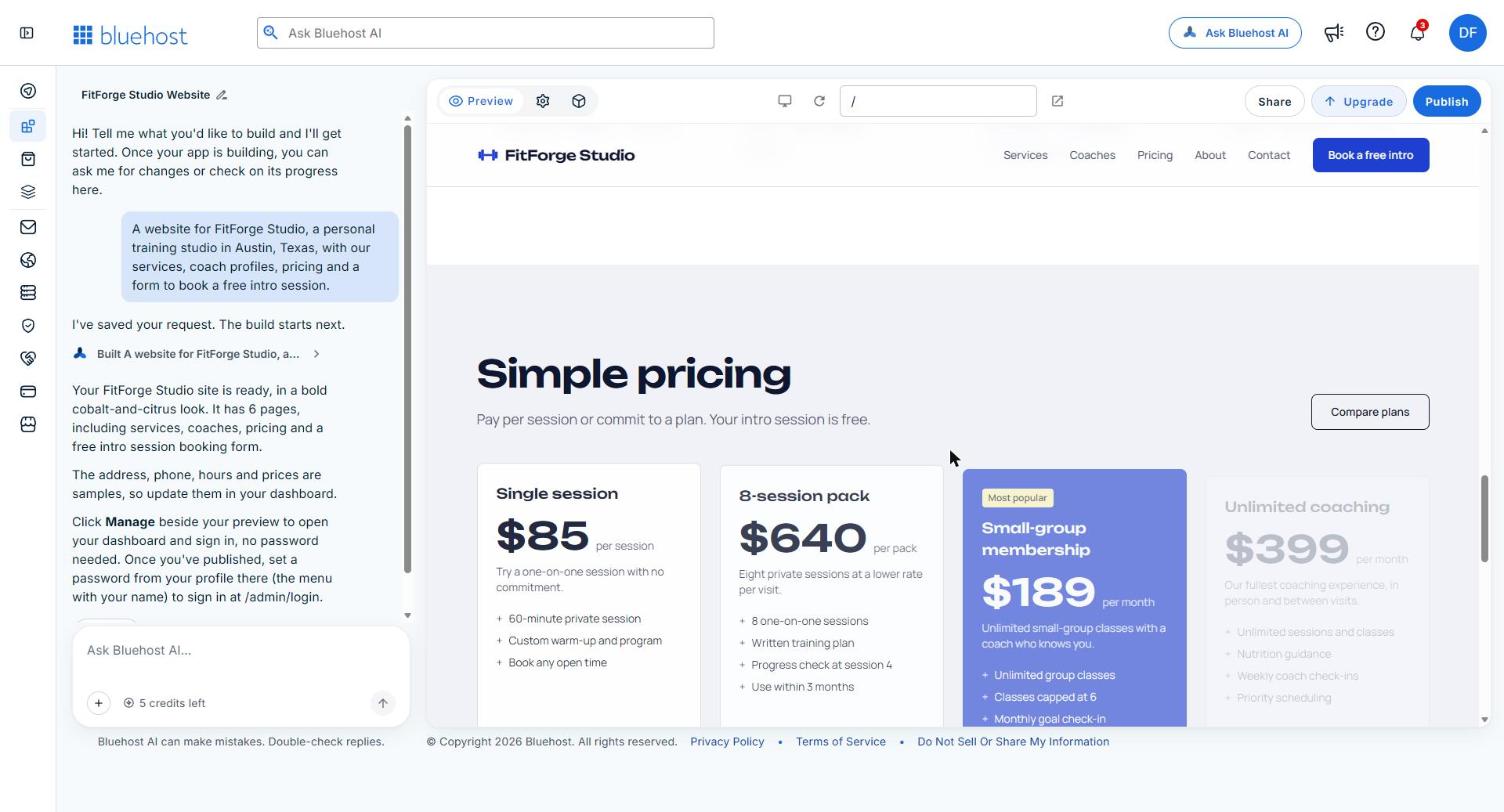
My first impression was genuinely good. The home page had a strong headline over a full-width gym photo, clear “Book a free intro session” and “See pricing” buttons, service cards, coach photos and a pricing table with four plans. It looked like a real studio’s website, not a generic template.
It was not perfect, though. The hero badge said 4 dedicated coaches while the number strip lower down said 3, and the yellow buttons clashed a little with the cobalt design. The prices were invented too, from $85 for a single session to $399 a month for unlimited coaching, so they need replacing before launch.
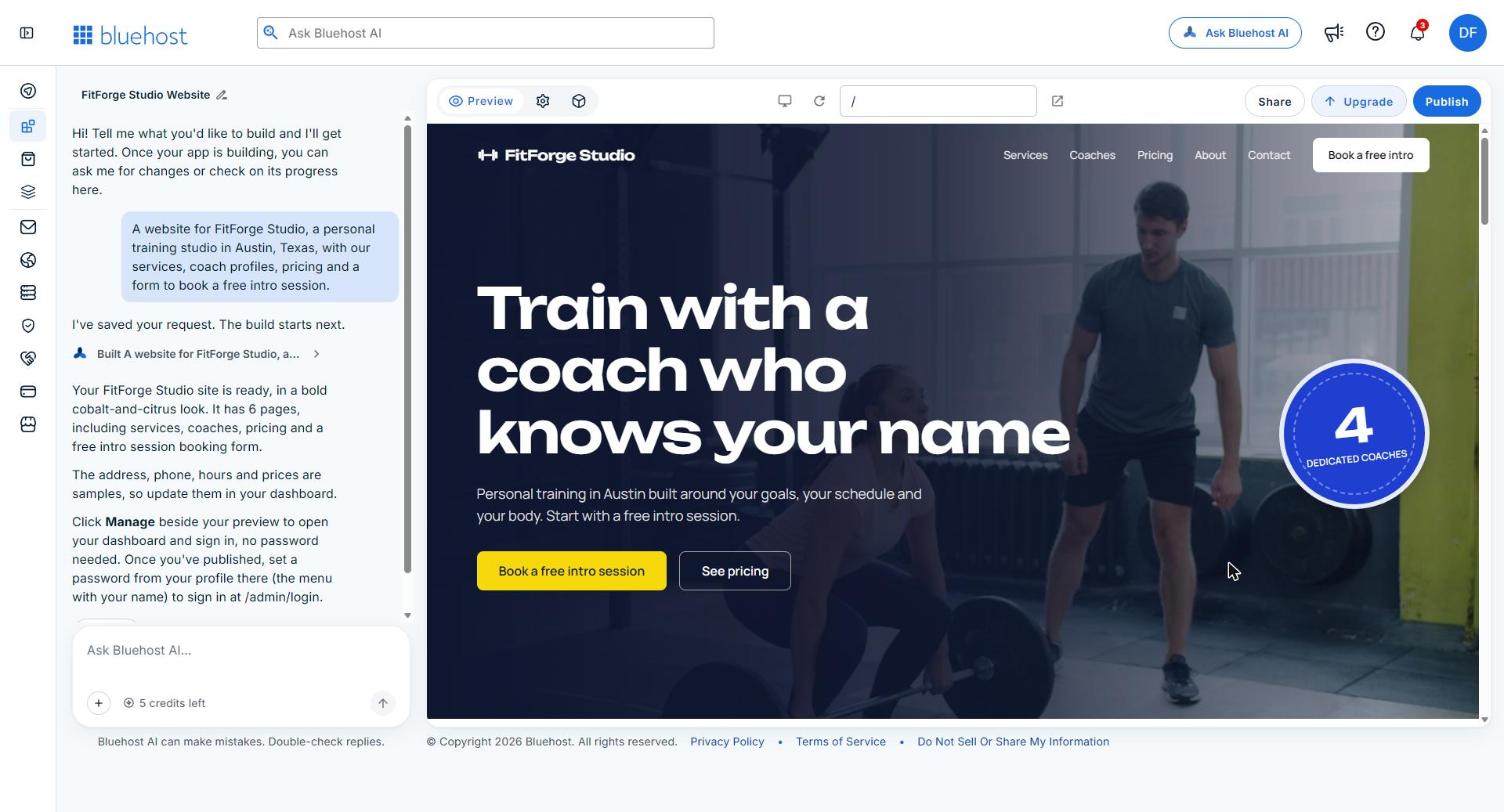
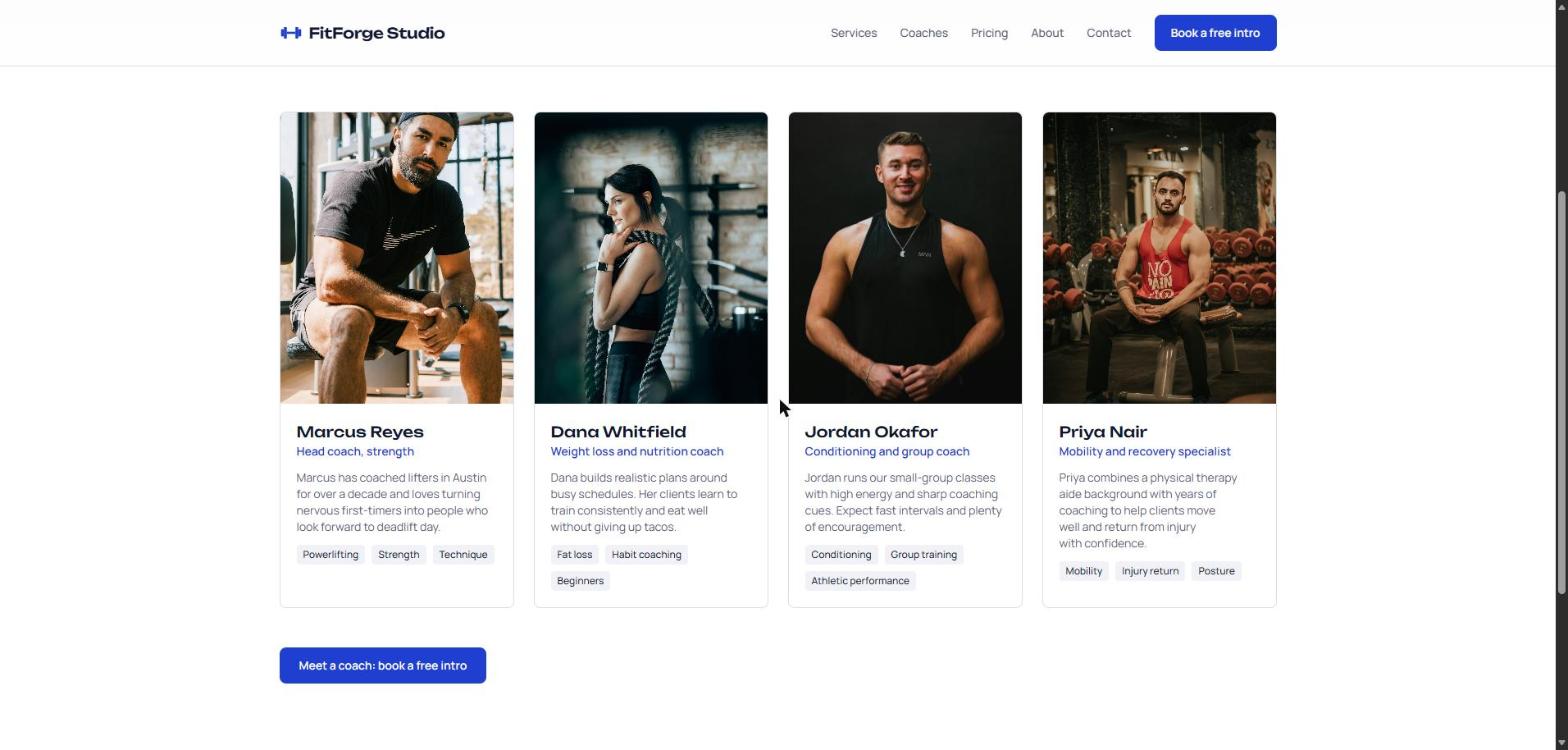
The inner pages were fleshed out too. The coaches page had four coach profiles with photos, specialties and short bios. All of it was invented sample content, so a real studio would swap in its own team.
Before and after: editing by chat
Next I tested how well chat edits land. I bundled three changes into one message:
“Change the hero headline to ‘Stronger in 12 weeks, coached every step’, make the yellow buttons cobalt blue to match the rest of the site, and fix the coach count so it says 4 coaches everywhere.”
About a minute later all three changes were done, and nothing else on the page moved. The AI also explained that the coach count now comes from the coach list, so it stays correct if I add or remove a coach. That is a thoughtful touch for a non-technical owner.

For the second edit I tested the web app side, again in a single message. I asked for a required training goal dropdown on the booking form, bookings only Monday to Saturday between 7am and 7pm, and our opening hours in the footer: Mon-Fri 6am-8pm, Sat 8am-2pm, Sun closed.
This took about two minutes, and the result impressed me. The form got the new dropdown, and the AI said both the form and the server now refuse bookings outside those times. It even caught a conflict I had created: because the studio closes at 2pm on Saturday, it ended Saturday booking slots at 1pm.

Bundle your changes into one message
Each message that changes your site uses one credit, no matter how big or small the change. Instead of sending three separate requests, combine them: “Change the headline to X, make the buttons green and add our opening hours to the footer.” You get three changes for one credit.
Adding my own logo
The next day I came back to test uploads. I attached a simple FitForge logo, a PNG with dark navy lettering, using the plus button in the chat. Then I asked AI Builder to use it in the header and footer and to keep it readable on the dark header.
It took about two minutes and used one credit. Because my lettering was dark, the AI placed the logo on a white rounded plate so it stayed readable over the dark hero photo and the footer. That is a design call I would otherwise have had to ask for separately.

Desktop and mobile views
Every site AI Builder makes is mobile-responsive. In my build, a toggle above the preview switched between desktop and mobile views without publishing. On mobile, the menu collapsed into a hamburger icon, the headline stacked neatly and the buttons stayed easy to tap. I did not need to fix anything.

Going live
Publishing took two clicks: Publish, then Publish now. The panel showed my free address ending in .app.bluehost.ai, plus buttons to buy or connect a domain, which need a paid plan. Publishing took about three minutes, and the panel says you can close it and keep working in the meantime.

The live site matched the preview exactly, with my new headline, the cobalt buttons, the booking form and the opening hours in the footer. I did not see a Bluehost badge on my free site, although Bluehost lists removing the badge as a Lite plan feature, so check this on your own build.
The sample street address was still labeled “(sample)”, which makes it easy to spot before you share the link.

On day one, my build used 3 of my 5 daily credits: one for the first build and one for each bundled edit. The logo test the next day used one more. Publishing used none. One small oddity: the counter still showed 5 credits right after the first build and only caught up after my first edit.
Bluehost AI Builder
Try the same build yourself on the Free plan and publish a real site without entering a card.
- No credit card to start
- 5 free credits a day
- Publish on a free Bluehost subdomain
- Hosting included
AI Builder Free, $0 to start, no credit card. Paid plans from $20/mo
Try Bluehost AI Builder Free View offer on provider websiteFree plan publishes on a Bluehost subdomain. Your own domain requires a paid plan. I earn a commission if you sign up through this link.
The Admin Dashboard Behind Your Site
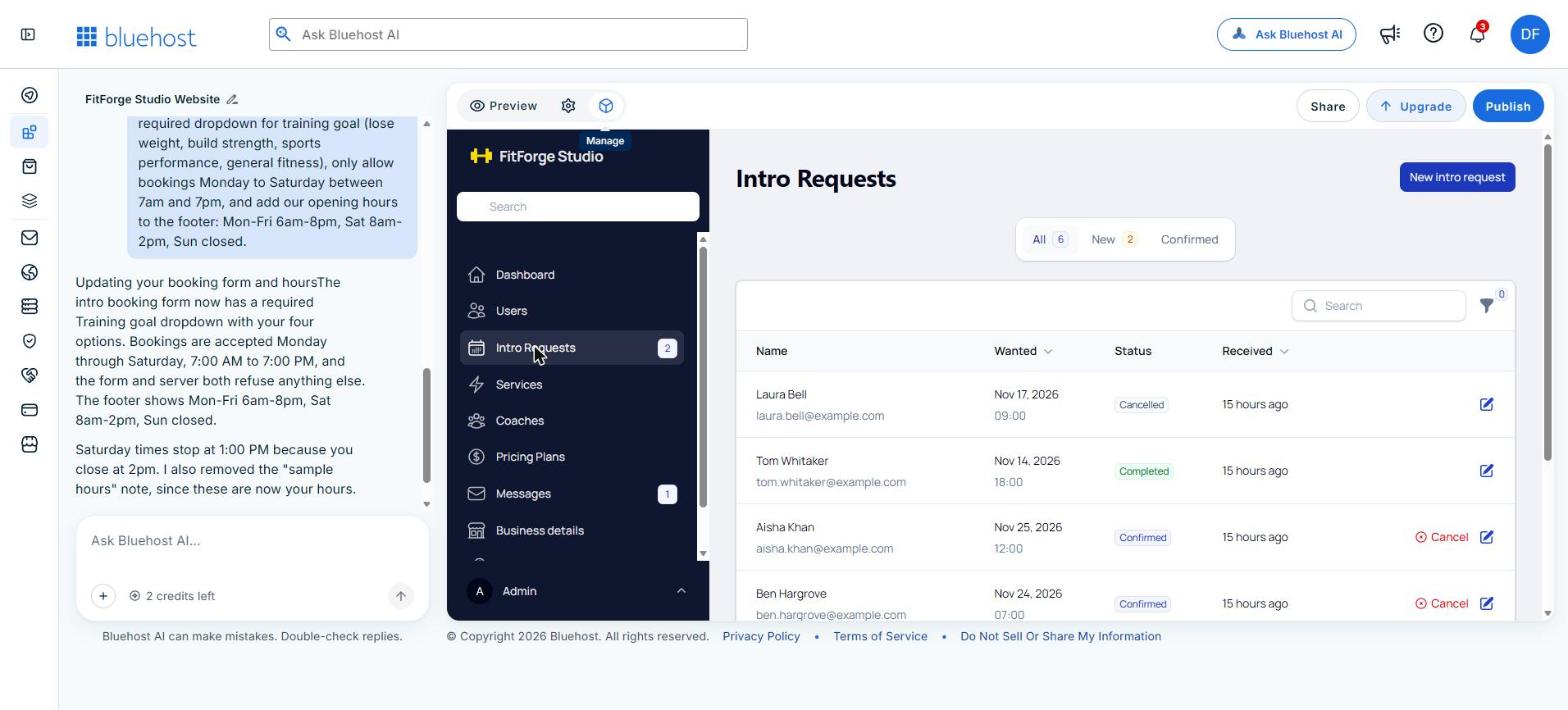
This is the part of Bluehost AI Builder that surprised me most. Click Manage above the preview and you get a full admin panel for your site, with sections for users, intro requests, services, coaches, pricing plans, messages and business details.

The dashboard home shows new intro requests, confirmed sessions, new messages and a chart of requests per week. Bookings submitted through the site’s form land in the Intro Requests list, where you can confirm, cancel or edit them.
Out of the box, the dashboard is filled with sample data: fictional requests from example.com addresses and sample messages. Delete these before you share the site, because the preview and the live site share one database.
Edit content without spending credits
The dashboard is also where you handle everyday updates. Services, coaches and pricing plans each have their own table with edit and delete buttons, and pricing plans have Featured and Shown toggles.
I switched a pricing plan’s Featured toggle on and off, and my credit balance did not change. That makes the dashboard the right place for routine updates like prices and coach bios, and keeps your credits for design and layout changes in the chat.

Set a password for your dashboard
Inside the builder, the dashboard opens without a password. After publishing, set a password from your profile in the dashboard so you can sign in at /admin/login on your live site.
How Bluehost AI Builder Credits Work
Credits are the part most people get confused about, so it is worth explaining clearly. A credit is used each time you ask AI Builder to create or change something. One message equals one credit, however large or small the change.
Several things do not use credits at all. The clarifying questions the AI asks before your first build are free, and so are questions that do not change your site. Hosting never uses credits either, so keeping your site online costs nothing in credits.
- Uses a credit: the first build, and every message that adds, removes or changes something.
- Free: the AI’s clarifying questions, questions that do not change the site, and hosting.
- Free plan allowance: 5 credits a day, up to 30 a month. Your daily allowance refreshes at 00:00 UTC.
- Paid plan allowance: a monthly pool of credits that refreshes each billing cycle.
- Expiry: monthly plan credits and top-ups expire after 30 days, so they do not stack up.
What happens when you run out of credits
This is the most reassuring detail in the whole product. When your credits hit zero, only new changes pause. Your published website stays online. You can wait for your credits to refresh, or on a paid plan buy a top-up of 50, 100 or 200 credits, starting from $15.
That matters if you are worried about usage-based pricing. With some tools, running out of credits feels like your site is at risk. Here the credits only pay for building and editing, not for keeping the lights on.
Your site stays online at zero credits
Running out of credits never takes your site down. Only new edits pause until your credits refresh or you top up. Hosting is included on every plan and never uses credits.
How far 5 credits a day really goes
Five credits sound small, but because one message can carry several changes, it goes further than you might expect. A realistic Free plan session looks like this: one credit for the first build, then three or four bundled edits to fix copy, colors and layout.
In my test, 3 credits were enough to build a 6-page site, make six separate changes and add booking rules, with 2 credits left over for the day. If you plan to make lots of small changes every day, or build several sites, that is when the monthly credits on a paid plan start to make sense.
Bluehost AI Builder Pricing and Plans
Bluehost AI Builder pricing is simple: $0 to start, no credit card, and paid plans from $20/mo. Every plan uses the same builder and includes hosting. The paid plans mainly differ in how many monthly credits you get, and all of them let you connect your own domain.
No credit card, no end date
Start Free- 5 credits a day, up to 30 a month
- Publish on a free Bluehost subdomain
- Hosting included
More features (2)
- 24/7 human support
- Your own domain
Renews at $20.00/mo on monthly billing
Get Lite- 100 credits a month
- Connect your own domain
- Hosting included
More features (2)
- Credit top-ups available
- 24/7 human support
Renews at $40.00/mo on monthly billing
Get Standard- 200 credits a month
- Everything in Lite
- Twice the monthly credits
More features (1)
- For frequent updates
Renews at $80.00/mo on monthly billing
Get Pro- 400 credits a month
- Everything in Lite
- Four times the monthly credits
More features (1)
- For several websites or apps
Watch the Renewal Price
The introductory rate applies only to the first term. Check the current renewal rate and billing commitment before purchasing.
Prices are in USD and were checked on AI Builder’s in-app upgrade screen in November 2026. On monthly billing, each paid plan renews at the same monthly rate. Paid plans are added by upgrading from inside AI Builder, and I earn a commission if you upgrade through my links.
The upgrade screen also offers a 12-month term with a lower first-year rate. Those annual rates renew higher, so compare the renewal price shown at checkout before you pick a term.

If you only need extra credits, top-ups come in packs of 50 credits for $15, 100 for $30 or 200 for $60, which works out to $0.30 per credit. You can also enter a custom amount from 50 to 10,000. Plan credits are used first, and top-ups last 30 days.
Free plan vs paid plans
| Feature | AI Builder Free | Lite | Standard | Pro |
|---|---|---|---|---|
| Price | $0, no card | $20/mo | $40/mo | $80/mo |
| Credits | 5 a day, up to 30 a month | 100 a month | 200 a month | 400 a month |
| Publish on Bluehost subdomain | ✓ | ✓ | ✓ | ✓ |
| Connect your own domain | ✗ | ✓ | ✓ | ✓ |
| Hosting included | ✓ | ✓ | ✓ | ✓ |
| Credit top-ups | ✗ | ✓ | ✓ | ✓ |
| 24/7 human support | ✓ | ✓ | ✓ | ✓ |
When should you upgrade?
The Free plan is a real plan, not a short trial. It has no end date, and you can build and publish as many sites and apps as you like, within Bluehost’s abuse-prevention limits. For testing an idea, building a draft for a client or sharing a simple page, it is enough.
Two things usually push people to a paid plan. The first is a custom domain: connecting yourbusiness.com requires Lite, Standard or Pro. The second is search visibility. Bluehost states that free .app.bluehost.ai addresses are not indexed by search engines, while sites on a connected custom domain can be indexed.
A sensible approach is to build and refine on the Free plan, and upgrade to Lite only when the site is ready for real customers. Upgrades start right away and are prorated, so you are not penalized for switching mid-month.
Key Features of Bluehost AI Builder
Beyond the prompt box, a few features stood out during my build. These are the ones that will matter most to a small business owner or first-time site builder.
Built-in basics for search
AI Builder writes page titles, descriptions, headings and image alt text automatically, so the basics are in place from the first build. Bluehost is clear that rankings depend on your content, location and competition, and no builder can guarantee a position. I earn a commission if you sign up through this link.
See Bluehost AI Builder →Web app tools: forms, bookings and sign-in
Web apps built with AI Builder can include forms, bookings, user accounts and an admin panel. If you build an internal tool that handles business data, you can ask it to require sign-in so only chosen people can see certain parts.
One thing to watch: the preview and the live app share one database. Any test booking or form entry you submit while trying things out becomes a real record, so clear out test data before you share the link.
Uploads and reference sites
Being able to drop in your own logo and photos, or point the AI at a site you like, makes a big difference to how personal the first version feels. In my test, one message with an attached logo was enough, and the AI adapted it to the dark header on its own.
Email notifications
If you want form submissions to arrive in your inbox, AI Builder sends notifications through your own Resend or Postmark account. This is an extra setup step, and the sending domain cannot be the free AI Builder domain, so it works best once you have your own domain on a paid plan.
You set this up under Settings, Email notifications: choose Resend or Postmark, paste your API key, and add a from address and from name. Bluehost does not send these emails for you, and SMTP is not supported.

Settings, domains and runtime
The Settings panel holds the project name, the public preview link, your address, domains, email notifications, secrets for API keys and runtime. It is also where you unpublish the site or delete the project. The Runtime page confirms that the app sleeps after 15 minutes idle and wakes on the next visit or edit.

Real people on call, 24/7
Every plan, including Free, comes with 24/7 human support through chat on the Bluehost website. Phone support runs from 7 am to midnight EST daily. Support helps with using AI Builder, plans, billing, publishing and domains, but it does not write or fix code for you. You still make changes by describing them in the chat.
For bigger jobs, Bluehost Professional Services is a separate paid service that can finish or extend a site for you.
Bluehost AI Builder Rating
I give Bluehost AI Builder an overall score of 9.2/10. This is an editorial score based on my hands-on build on the Free plan and Bluehost’s published plan details, not a lab benchmark.
- Ease of use 9.7/10: one sentence gets you a first version, and every change after that is a chat message.
- Value 9.5/10: a real Free plan with no card and no end date, hosting included, and paid plans from $20/mo.
- Support 9.2/10: 24/7 human chat support on every plan, including Free.
- Performance 8.8/10: mobile-responsive sites, but idle apps sleep after 15 minutes and load slower on the next visit.
- Features 8.8/10: websites and web apps with forms, bookings and sign-in, held back by no undo, no code export and no collaborators.
Bluehost AI Builder Pros and Cons
- Free plan with no credit card and no end date
- One sentence gets you a full first version
- Edit design, copy and layout just by chatting
- Hosting included and never uses credits
- Site stays online even at zero credits
- Builds web apps with forms, bookings and sign-in
- 24/7 human support on every plan
- Free subdomain is not indexed by search engines
- Your own domain requires a paid plan
- No undo button, reverting a change uses a credit
- No code export or FTP access
- No online selling or checkout, use AI Store instead
- Email notifications need a Resend or Postmark account
Limits to Know Before You Start
No builder is perfect, and it is better to know the limits before you invest time in a project. These are the ones I would want a friend to know about Bluehost AI Builder.
- No undo: you revert changes by asking the AI, which uses a credit.
- No collaborators: you can share a view-only link, but you cannot invite someone else to edit.
- No code export: there is no source code download or FTP. You can ask for a CSV export button in your admin panel for your data.
- Fixed free address: the .app.bluehost.ai address is generated for you and cannot be changed.
- Sleeping apps: after 15 minutes without visits, a published app goes to sleep, so the next visit loads a little slower.
- Sample data: the dashboard starts with fictional bookings and messages that you need to delete before launch.
- No native mobile apps: everything runs in the browser, not the App Store or Google Play.
Review what the AI writes
AI Builder fills your pages with generated copy, and it can include sample details such as prices, opening hours or promises you never gave it. Read every page before you publish and replace anything that is not true for your business.
Bluehost AI Builder vs AI Store vs WordPress Hosting
Bluehost now offers three different ways to get online, and picking the right one saves you from rebuilding later. Here is how Bluehost AI Builder compares with the other two options.
| Feature | Bluehost AI Builder | Bluehost AI Store | WordPress Hosting |
|---|---|---|---|
| Best for | Websites and web apps | Online stores | Full control of a WordPress site |
| How you build | Describe it and chat | AI store setup | WordPress themes and plugins |
| Coding or WordPress needed | ✗ | ✗ | Some WordPress knowledge |
| Product catalog and checkout | ✗ | ✓ | With plugins |
| Access to files and code | ✗ | ✗ | ✓ |
In short: choose Bluehost AI Builder if you want a business website or a simple web app without touching code. Choose Bluehost AI Store if your main goal is selling products. Choose WordPress hosting if you want full control over themes, plugins and files. You can read more in my full Bluehost review.
Who Should Use Bluehost AI Builder?
After building with it, I think Bluehost AI Builder fits these people best:
- Small business owners who need a professional site for services, hours and contact details and do not want to learn WordPress.
- Freelancers and consultants who want a portfolio or landing page live in an afternoon.
- Service businesses that need a simple booking or quote request tool alongside their website.
- Anyone testing an idea who wants to build and share a real working draft without paying first.
It is a weaker fit for these people:
- Online sellers: AI Builder does not support ecommerce, so use Bluehost AI Store instead.
- Developers and agencies who need code access, file exports or several people editing the same project.
If you want a traditional host for a WordPress site instead, see my guide to the best WordPress hosting.
Final Verdict: Is Bluehost AI Builder Worth It?
Bluehost AI Builder does what it promises: one sentence in, a working website out, and every change after that is just a message. The Free plan is genuinely useful because you can build and publish a real site without a credit card, and the credit system is fair because your site never goes offline when you run out.
The trade-offs are clear. A free site lives on a Bluehost subdomain that search engines do not index, so a public business site needs a paid plan and your own domain, starting at $20/mo. There is also no code export or undo. For most small businesses, though, the speed and simplicity outweigh those limits.
My recommendation
Start on the Free plan, build your site, and refine it until you are happy. Upgrade to AI Builder Lite only when you are ready to connect your own domain and go public.
Bluehost AI Builder
The easiest way to turn a one-sentence idea into a live website or web app, with hosting and 24/7 support included.
- One sentence to a first version
- Refine everything by chatting
- Hosting included on every plan
- Site stays online at zero credits
AI Builder Free, $0 to start, no credit card. Paid plans from $20/mo
Try Bluehost AI Builder View offer on provider websitePaid plans are billed monthly and renew automatically until canceled. Your own domain requires a paid plan. I earn a commission if you sign up through this link.
Frequently Asked Questions
Is Bluehost AI Builder really free?
Yes, Bluehost AI Builder is $0 to start, with no credit card required and no end date. The Free plan includes 5 credits a day, up to 30 a month, and lets you publish on a Bluehost subdomain. Connecting your own domain requires a paid plan, from $20/mo.
How do credits work in Bluehost AI Builder?
Each message that creates or changes your site uses one credit, no matter how big the change. The AI’s clarifying questions are free, and hosting never uses credits. Monthly plan credits and top-ups expire after 30 days.
What happens to my site if I run out of credits?
Your site stays online. When credits run out, only new changes pause until your credits refresh or you buy a top-up. Your published website keeps working the whole time.
Can I use my own domain with Bluehost AI Builder?
Yes, but only on a paid plan. AI Builder Lite, Standard and Pro all let you connect a domain you own or buy a new one. The Free plan publishes on an automatically generated address ending in .app.bluehost.ai.
Can I build an online store with Bluehost AI Builder?
No, Bluehost AI Builder does not support online selling or checkout. It is built for websites and web apps such as bookings and forms. If you want to sell products online, Bluehost recommends Bluehost AI Store.
How much do extra credits cost in Bluehost AI Builder?
Top-ups cost $15 for 50 credits, $30 for 100 credits or $60 for 200 credits, which is $0.30 per credit. Plan credits are used first, and top-up credits expire 30 days after purchase.
Does Bluehost AI Builder include an admin dashboard?
Yes, sites and apps built with Bluehost AI Builder include an admin panel. In my test it had sections for users, bookings, services, coaches, pricing plans and messages, and editing content there did not use any credits.
Is Bluehost AI Builder good for SEO?
It covers the basics automatically, including page titles, descriptions, headings and image alt text, and every site is mobile-responsive. Free subdomain sites are not indexed by search engines, so you need a paid plan with your own domain to appear in search. No builder can guarantee rankings.
Ready to try it? Start free with no credit card. I earn a commission if you sign up through this link.
Read next
The Review
Bluehost AI Builder
I tested Bluehost AI Builder on the Free plan to see how far one sentence can take you. I described a small business and got a full first version of the site. Then I refined the design, copy and layout just by chatting, and published it without entering a credit card. Credits are simple: one message uses one credit, and my site stays online even when I run out. The main catch is that free sites live on a Bluehost subdomain that search engines don’t index. To go public on your own domain you need a paid plan, from $20/mo. For small businesses and beginners who want a real site without learning WordPress, it’s one of the easiest ways to get online.
PROS
- Free to start, no credit card needed
- One sentence builds a full first version
- Every edit is a simple chat message
- Hosting is included on every plan
- Your site stays online at zero credits
- Builds web apps with forms and bookings
- 24/7 human support, even on Free
CONS
- The free subdomain isn’t indexed by Google
- Your own domain needs a paid plan
- There’s no code export or FTP
- It can’t sell products (use AI Store instead)
Review Breakdown
-
Ease of use
-
AI build quality
-
Editing by chat
-
Value for money
-
Support